2026-11-11 · ~6 min
Write for the Person Who Has to Read It
A short VOICE.md gives your AI examples of what an instructor or teammate needs to see first.
Your class project is due tomorrow. The submission asks you to explain what your app does and what you tested. You give an AI your notes and ask for a paragraph to paste into the project report. It writes, “The application provides a consistent authentication experience across devices.” You tested sign-in on your own laptop.
Or you are a few months into your first developer job, and a bug ticket is waiting for an update. You paste the thread into an AI and post what comes back. It is four paragraphs long, and the question you needed answered is in the last one.
Write for the human who has to read it. Your instructor needs to know what worked and what you still need to check. Try “I signed in on my laptop and reached the dashboard. I still need to test sign-in on a phone.” Your instructor can tell what you did after one read, and you can show them what happened if they ask. Your teammate needs the same thing from a ticket: what you found, and what they have to do next.
An AI draft can turn two plain sentences into a paragraph full of phrases you would never say. It can also make the work sound more complete than it is. When you paste that paragraph into a report or a ticket, it carries your name. Readers notice, too. An instructor grading forty reports and a lead reading twenty tickets can tell a pasted draft by the second line, and from then on they read everything you write a little more slowly.
I tell my students and junior teammates the same thing: Don't let AI do what you can't do or understand yourself. That applies to the words you publish under your name. If a draft says the bug is caused by permissions, you should be able to explain what you checked and why it points to permissions. If you only know that two accounts got different results, say that. Read the draft aloud before you post it. Rewrite any sentence you wouldn't say or couldn't explain if someone asked.
Fixing one draft by hand is easy. Fixing the same draft every week is the part that wears you down, because the AI forgets your fix the moment the chat closes. A short file called VOICE.md is how you make it remember. You write one rewrite down as an example, the agent reads it before it drafts, and the next comment starts closer to what your reader needs. The rest of this note shows one rewrite worth saving and the file to save it in.
Start with the question you need answered
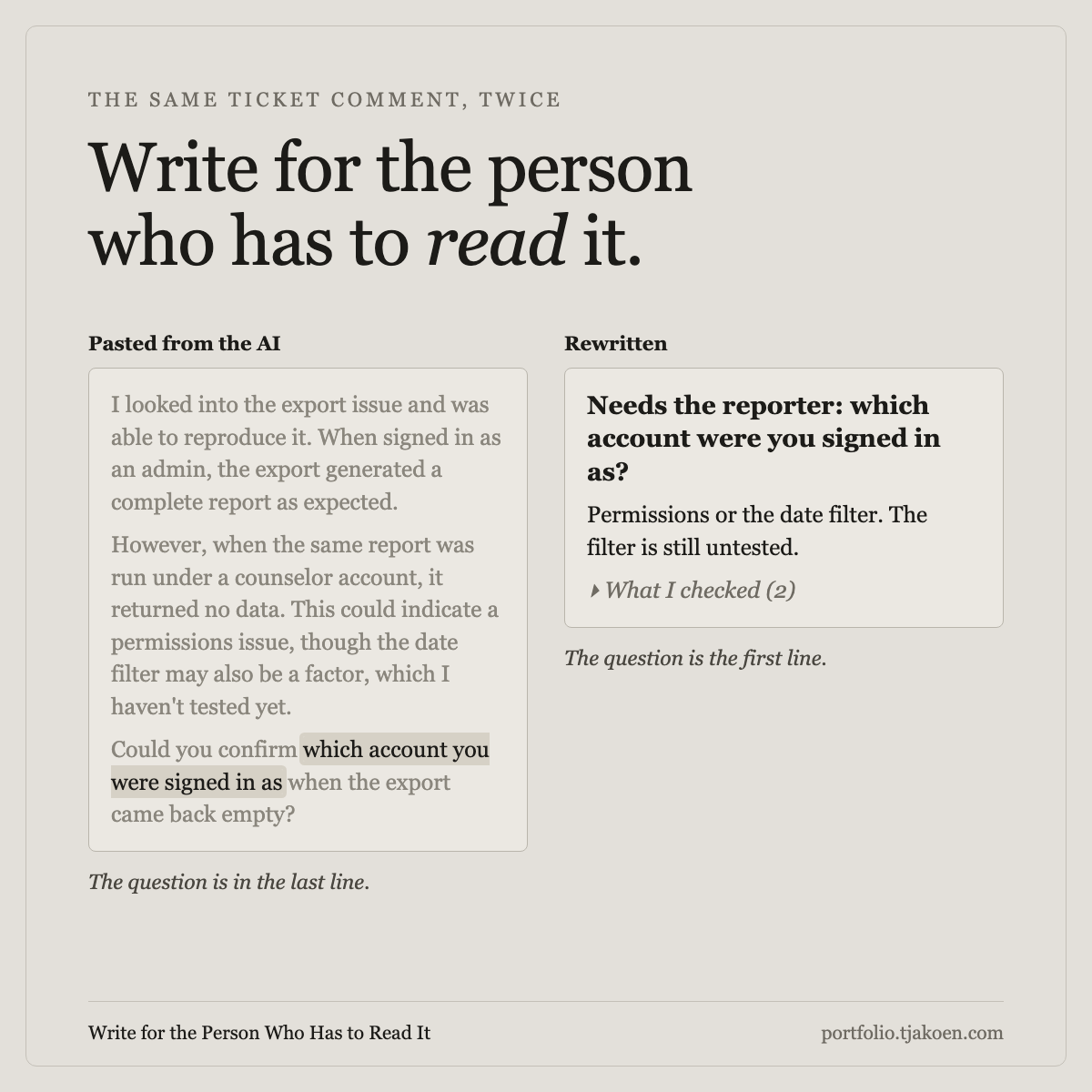
The same habit applies to a ticket, a shared record of a bug or a piece of work. Say someone reported an empty export. You tried two accounts and got different results. To take the next step, you need to know which account the reporter used.
Before
I looked into the export and got a full report as an admin and an empty one as a counselor. It could be permissions or the date filter, which I haven't tested yet. Which account were you signed in as when your export came back empty?
After
Needs the reporter: which account were you signed in as when the export came back empty?
Permissions or the date filter could explain the empty export. The filter is still untested.What I checked (2)
- Export fills for an admin account.
- The same report as a counselor comes back empty.
The date filter stays visible because it could change what you investigate next. The two account checks can sit under the disclosure because the reporter can answer without opening it.
Use these three questions to check your next draft before you post.
What goes in the file
Write down the examples you want the agent to follow.
You can keep a VOICE.md for yourself in a class repo or a side project. On a team, ask whoever owns the repository whether one exists, and offer to start it if it does not. The rest of this section is the setup.
The agent reads AGENTS.md or CLAUDE.md when the session opens. That file tells it which tests to run. When you ask for a ticket comment, the agent also needs to know what the reader should see first. Without an example, it may recount the work and leave the question at the bottom.
Put VOICE.md beside the instruction file and add a line telling the agent to read it before writing. Use an example from your own tracker to show where the question goes in a ticket. Do the same for a review and a chat message.
Forty lines that get read beat four thousand that get skimmed, because the file competes with the code for the model's attention. Examples carry more than adjectives. One bad comment and one good one teach a register faster than a page saying be clear and concise, which every writer already believes and the model will cheerfully agree with while doing the opposite.
The rules worth writing down are about where things go, not about taste:
- Put the ask first. The first line says what the reader has to do and who has to do it: needs a check, needs the reporter, fixed and back to you.
- Put the proof under a label with a count. What I checked (2) tells the reader whether opening it is worth the tap.
- Keep what you have not tested in view. If a claim rests on something untested, say so next to the claim, never inside the fold.
- A one-line comment stays one line. Structure is for comments with more than one thing to say.
Write them as rules, not as a list of banned words. Ege Vusal Chelebi tried a writing skill a writing skill derived from Simplified Technical English on six tasks. The linter counted 74 percent fewer violations per hundred words on Claude Sonnet and 50 percent fewer on GPT-5.5. A banned-word list cut violations by 3 percent and 40 percent, respectively. The linter scored the writing against a set of rules. The test did not measure whether readers found the ask faster.
My own standard is public at portfolio.tjakoen.com/standards/voice. It is longer than a team needs because it is also a guide to one person's prose. Take its structure, not its length: the registers, the scan rule, the list of shapes it refuses.
Try the template on one comment you are about to post. If you are working on a class project, use a paragraph from your project report and ask your instructor which version they would rather grade. On a team, bring the original and your rewrite to your next one-on-one and ask which one they could act on faster.
# VOICE.md

How we write anything a teammate reads: ticket
comments, pull request bodies, review comments,
chat, docs. Read this before drafting. Where a
rule here fights the model's default, this file
wins.

## The one rule

Front what the reader has to do. Fold what only
proves it. Never fold a hedge.

## By surface

### Ticket comment
- First line in bold: the action and its owner.
  Needs a check, needs the reporter, fixed and
  back to you.
- Then short groups under a plain lead-in: what
  I checked, what is still open.
- A blank line between groups. Every ticket key
  is a link.
- One thing to say? One line. No heading, no
  bullets.

### Pull request body
- Start with what changed and what you need the
  reviewer to check. Keep open risks visible.

### Review summary
- Start with the verdict and the next action.
- Tests and proof fold under a label with a
  count.

### Review comment
- Ask, do not declare. State the mechanism,
  then put the fix as a question the author can
  say no to.
- The proof folds. The caveat does not.

### Chat
- The ask is the first sentence. No "quick
  question" preamble.
- One update per message, not a status report.

### Docs
- Full prose. No fragments, no compression. All
  the articles.

## Never
- Em dashes. Use a comma, a period, or
  parentheses.
- Backticks in prose. Code and literal terminal output only, never for emphasis.
- "It's not just X, it's Y." "I hope this
  helps." "In conclusion."
- A list of exactly three tidy bullets, every
  time.
- A hedge moved out of sight.

## Before and after

Bad:
> I looked into the export and got a full report
> as an admin and an empty one as a counselor.
> It could be permissions or the date filter,
> which I haven't tested yet. Which account were
> you signed in as when your export came back empty?

Good:
> **Needs the reporter:** which account were you
> signed in as when the export came back empty?
>
> Permissions or the date filter could explain
> the empty export. The filter is still untested.
>
> <details>
> <summary>What I checked (2)</summary>
>
> - Export fills for an admin account.
> - The same report as a counselor comes back empty.
>
> </details>

On a tracker without disclosures, put the proof
below the ask and caveat under the same label.

Replace these two examples with a real pair from
our tracker. A real bad comment is worth ten
invented ones.
The examples are the part to replace first. A comment that made someone scroll and a rewritten one that did not are worth more than anything invented here.
The same file can point the other way
A voice file can also describe how you want the AI to talk to you.
Everything above is about how the AI should sound when it writes as you. Kercwin, the tech lead on my team, went the other direction. Before he built his epic checker, he showed the team how he makes Claude talk to him: tables, diagrams, specific wording, a format his brain reads fast. His file is about the reader at his own desk.
Both files rest on the same idea. Someone has to read what the model writes, and the file tells the model who that is. If you lose the point of a long AI answer halfway down, write down the shape you read fastest and put it beside your VOICE.md. One file shapes what you send your team, and the other shapes what comes back to you.
A file nobody points at is a file nobody reads
An agent reads what its instruction chain tells it to read.
If VOICE.md sits at the root and the file that loads at session start never mentions it, the model will find it sometimes and ignore it most of the time. The change is two lines: one in AGENTS.md saying to read VOICE.md before writing anything a person reads, and one in the review or ticket skill if the team has one. The agent already reads the plan before it codes. It reads the voice file before it comments.
Placement in the workflow matters as much as placement in the tree. The file has to be in front of the model at the moment of drafting, not in a wiki it has never opened. If the tool ignores repository files, the file is not in force. Paste it in, or accept that the default is still doing the writing.
What the file cannot do
A file is a prompt, not a guarantee.
It drifts. Models change and teams change, and a rule nobody has edited in a year is probably describing a surface nobody uses. The maintenance is small and it is not optional: when a bad comment lands, add it as an example.
It does not stop the paste. Someone will drop in a generated comment that never read the file. What the file gives the next person is a standard to point at, which is more than a bad comment usually gets.
Before the team changed its review format, folded feedback was acted on less often than visible feedback. The sample since the change is small, so it is still open whether folding helps. A reader who never reaches the ask cannot act on it.
On your next ticket, write the first line yourself. Then give the agent that line, your checks, and the voice file. Before you post, make sure the question is still there and that anything you have yet to test is visible. Use words you would say and keep the claims you can explain. If the rewrite helped, save the pair for the next person who has to write one.
The judgment is human. The typing, by design, is not.